
Parameters and Output Formats
Category: Proxy Extraction | Updated: 2026-09-14
You need to understand every parameter in order to stably integrate the proxy into the business. This page is a comprehensive index of all parameters and their usage.
On this page:
- Username (username) parameter overview
- Concatenation rules and complete examples
- IP Validity: How to Choose Among Three Modes
- Quick Reference for Regional Names and Codes
- Scenario-based parameter combination recommendation
- Six common writing mistakes
Username Parameter Overview
The 'magic' of username/password authentication is all in the username: it is composed of several key-value segments joined by underscores, used to tell the gateway 'which region, how long to keep, whether to reuse the same IP'. The password is always the sub-account password and does not need to be concatenated.
| Name | Description |
|---|---|
username | Username (sub-account name, the following parameter section) |
password | Password (sub-account password, no need to concatenate parameters) |
session | Within the IP validity period, the same session will prioritize reusing the same IP; if not filled in, each request will prioritize allocating different IPs. Up to 12 characters |
life | Maintain IP usage time, maximum 120 minutes |
area | Global region code, for example, United States area-US (country code) |
city | The city it belongs to, for example New York city-newyork (city code) |
state | State / Province, for example New York State state-Newyork (state code) |
asn | Carrier ASN, for example asn-12345 |
Example host is not a fixed value
us.duckip.net:1000(dynamic residential proxy) andas.duckip.net:2000(static residential proxy) are documentation examples. Host prefixes vary by region and product. Always use the host and port copied from your dashboard.
You don't have to memorize the concatenation order First, select the parameters in the dashboard, and then you can directly copy the generated results. Manual typing is only used for programmatic dynamic region switching (for example, polling multiple countries with the same account).
Concatenation Rules and Complete Example
# Structure: Sub-account   Each parameter section (underscore separated)
subaccount_area-US_state-ALASKA_city-ANCHORAGE_life-5_session-7BhsSJv2788rr

# The complete form after generating to the target end
Proxy Server: us.duckip.net
Port: 1000
Username: subaccount_area-US_state-ALASKA_city-ANCHORAGE_life-5_session-7BhsSJv2788rr
Password: subaccount_password
Use underscores (_) between segments·Use hyphens (-) between keys and values·Omit an entire segment when the parameter is unused·Copy region codes instead of typing them manually
About Uppercase and Spelling Please try to select the state/city code from the dropdown menu in the dashboard and then copy it, rather than writing it from memory. If the area code is entered incorrectly, it usually won't trigger an error; instead, it will appear as 'IP landing in an unexpected country' or fall back to random assignment.
IP Validity: How to Choose Among Three Modes
| Mode | Dashboard Options | Parameter Performance | Applicable Scenarios |
|---|---|---|---|
| Change on each request | Change on each request | Do not write session, do not write life | Tasks that do not require identity continuity, such as public data collection and bulk price comparison. |
| Specified Duration (Sticky) | Specified Duration IP Persistence | Write life-5 (1–120 minutes) | Tasks that require a stable exit over a period of time, such as login or order processes. |
| Session-level reuse | Specified validity session | life-30_session-abcd1234 | Multiple accounts / multiple environments: each environment has a fixed session, no cross-account interference. |
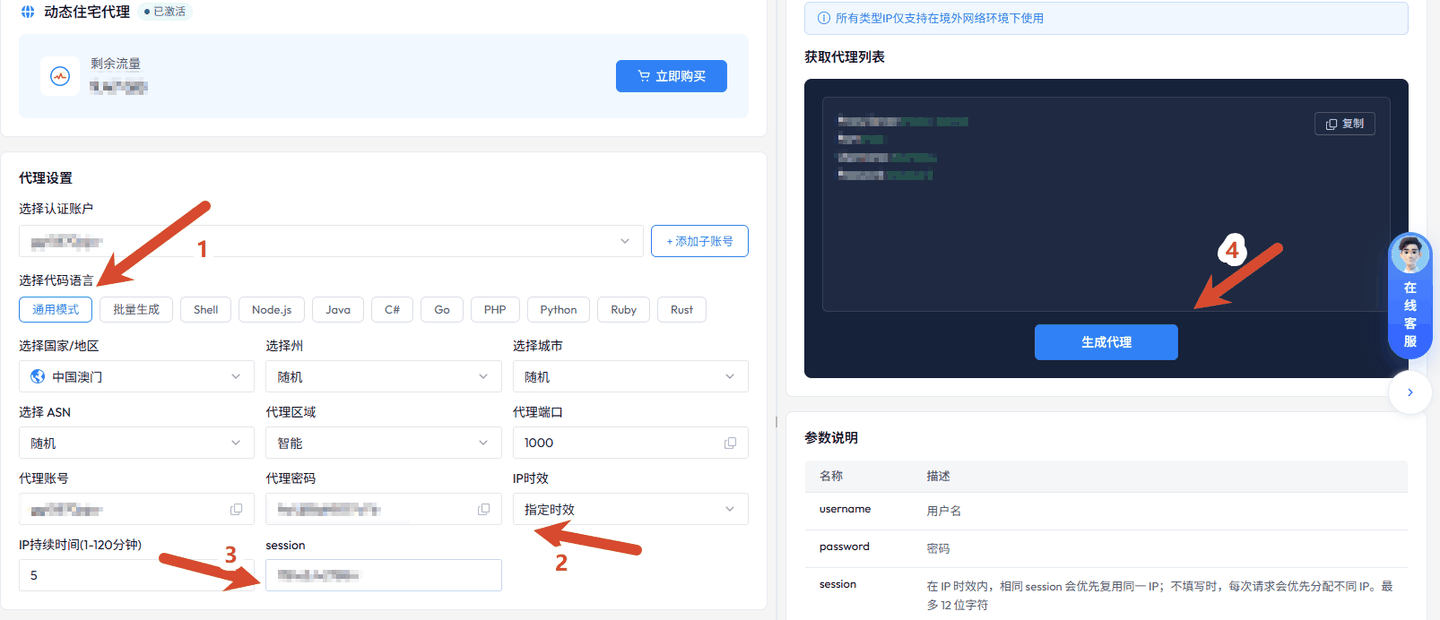
Check the "IP Validity" and session sections, select "Specify Validity" and set the IP duration and session, and you will get a sticky proxy
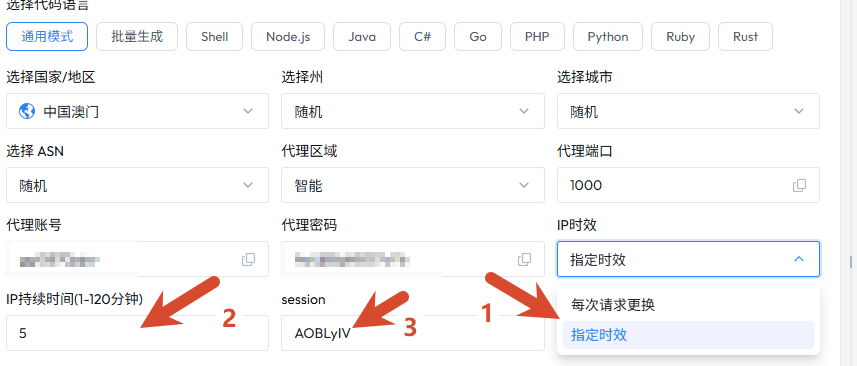
Look at the red annotations 1—3 Annotations 1—3: Specify time validity → Duration (example: 5 minutes) → Session (example: AOBLyIV)
Quick Reference for Regional Names and Codes
| Level | Account & Password Authentication (username) | API Extraction (URL Parameters) | Example |
|---|---|---|---|
| Country / Region | area-US | cc=US | United States US, Germany DE, United Kingdom GB, as well as Hong Kong, Taiwan, Macau, etc. |
| State / Province | state-ALASKA | state=BAVARIA | U.S. states, German federal states, etc. |
| City | city-ANCHORAGE | city=NUREMBERG | City-level orientation |
| Carrier | asn-12345 | Subject to the dashboard provided | Designated ISP segment, suitable for verification tasks sensitive to the line |
The Difference Between 'Proxy Region' and 'Country Targeting' The 'Proxy Region' in the dashboard is used to specify the major region where the IP pool is located (such as the Americas). The default intelligent setting is fine; it is a different concept from area/cc country targeting—the former chooses 'which major region the pool is in,' while the latter chooses 'which country/city the IP lands in.'
Scenario-Based Parameter Combination Recommendation
| Business Scenario | Recommended Combination | Description |
|---|---|---|
| Fingerprint browser multi-account | username/password authentication life-60 Each environment has an independent session | Stable output, accounts do not interfere with each other; 'Batch generation' can produce a set at once. |
| Public Data Collection / Crawling | API Extraction (num by concurrency) Short life | Fetch as needed, automatic IP rotation, cost controllable. |
| E-commerce price comparison / Inventory monitoring | username/password authentication National targeting Specified timeliness | Continuous requests on the same site can reduce the probability of risk control. |
| Ad verification / Landing page verification | username/password authentication Country City targeting | Ensure what is seen is the real view of the target area. |
| Mobile App / Simulator | username/password authentication General Mode Specified Validity | The fields that the client needs to fill in manually are minimal. |
| Long-term Store / Account Hosting | Static Residential Proxy (Traffic or Bandwidth) Fixed IP | IP does not change automatically, account identity is most stable. |
| Long-running, high-concurrency collection | Unlimited residential proxies (tiered by bandwidth, concurrency, and billing cycle) | Traffic is unlimited during the billing period; bandwidth and concurrency determine capacity. |
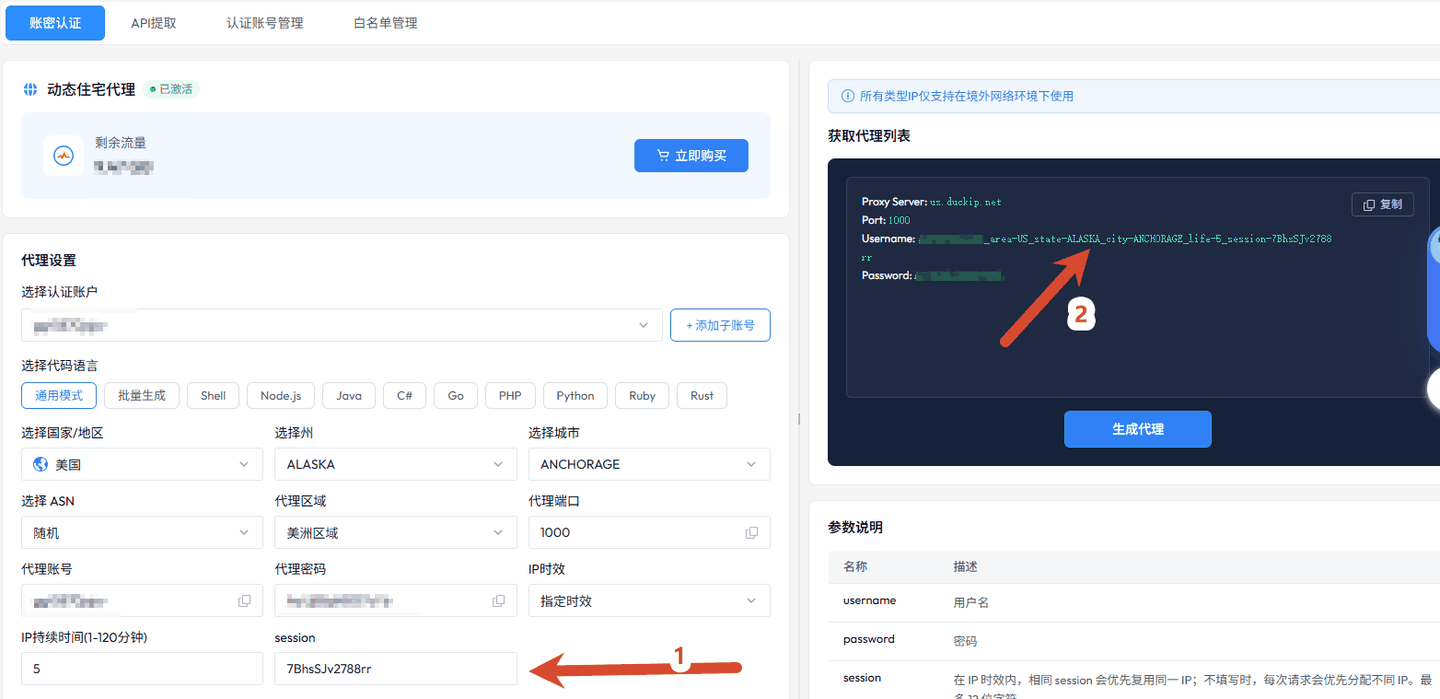
Observe the linkage between the left and right columns. Any change in the parameters on the left will synchronously update the username generated on the right.
Six Common Writing Mistakes
| Phenomenon | Common Causes | Correction |
|---|---|---|
| Authentication failed / No response | Username was edited a second time, parameter segment missing an underscore or contains extra spaces | Directly use the result from the "Copy" button, do not manually modify. |
| IP located in the wrong country | area / cc misspelled, or selected a region not for this product | Re-select from the dashboard dropdown and copy. |
| All environments have the same IP | The same session was reused during batch generation | Regenerate a batch of sessions, or use 'Batch Generate' for automatic allocation. |
| Frequent IP changes | life not set, or 'Change on every request' selected | Change to 'Specify duration' and set 30–120 minutes. |
| Long-term unchanging IP is rate-limited | life limit of 120 minutes and continuously reusing the same session | Regularly rotate sessions, or reduce the request frequency per single IP. |
| Multiple results stuck together in one line | lb (delimiter) does not match the parsing method | Choose line break / tab or other delimiters according to script parsing habits. |
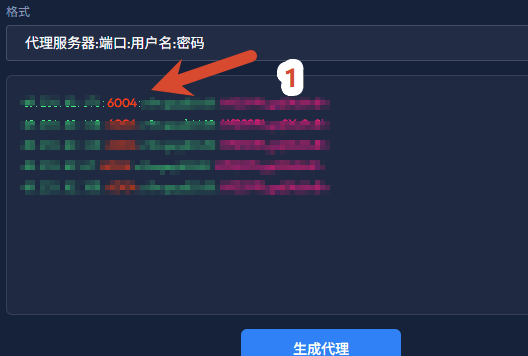
Look at the 'Format' column options. After selecting 'Proxy:Port:Username:Password' in the format column, you can directly paste it into the proxy manager.
Related Documents Proxy Usage Instructions (Command Line / Code / Client Integration) | username/password authentication Extraction