
Overview and Proxy Connectivity Checks
Category: antidetect browser | Updated Date: 2026-09-14
All antidetect browsers cannot avoid these four steps. First read this page, then look at the specific client operation steps.
On this page:
- Why antidetect browsers must be configured with proxies
- Universal Four-Step Method (Applicable to All antidetect browsers)
- Step 3 Detailed Explanation: Batch Testing of Proxy Connectivity
- How to choose protocols and testing channels
- Browser profile consistency principles
- It is recommended to maintain an 'environment ledger'
- Which antidetect browser should I choose
This page is the 'common base' for all antidetect browser configurations: first clarify why proxies and fingerprints need to be configured in pairs, and then run the link through using the general four-step method. For specific client click positions, please refer to the chapters of each client.
① Verify the pre-network → ② Extraction Proxy → ③ Batch Connectivity Testing → ④ Create a new environment and import the proxy → ⑤ Open the environment to check the IP
| What to get this round | Where to get it | What to use it for |
|---|---|---|
| Four proxy information items | Dashboard 'Account & Password Authentication → Bulk Generation' | Host, Port, Username, Password → Enter into antidetect browser |
| Or an extraction link | Dashboard 'API Extraction' | Fill in a client that supports API extraction mode, the extraction quantity is fixed at 1 |
| Number of sessions corresponding to the environment | One session per item when generating in bulk | Ensure that the egress IP of each environment is unique |
Example host is not a fixed value
us.duckip.net:1000(dynamic residential proxy) andas.duckip.net:2000(static residential proxy) are documentation examples. Host prefixes vary by region and product. Always use the host and port copied from your dashboard.
Why a antidetect browser Must Be Configured with a Proxy
An antidetect browser solves the problem of 'whether the browser environment looks like the same device', while a proxy solves the problem of 'where the network exit appears to come from'. The two must match: if the environment fingerprint is a US Windows system but the egress IP is in Germany, the risk control system will immediately classify this environment as abnormal.
| Element | Decided by whom | Things to do right |
|---|---|---|
| Egress IP / Location / ASN | Proxy | Bind each environment to a separate egress IP; match its country and city to the account's registration location when possible. |
| Time Zone / Language / Location | Proxy + browser profile settings | Match the proxy's egress country instead of the local system. |
| Hardware and browser fingerprints | Fingerprint browser configuration | Keep each environment different from each other, and the same environment unchanged for a long time. |
| Login Status / Cookie | The Environment Itself | Only one account is logged into an environment to avoid cross-interference. |
General Four-Step Method (Applicable to All antidetect browsers)
- Verify that the local overseas environment is normal
- Interface Location: Local / Upstream Node
- How to operate: Directly execute
curl -s api.ip.cc, confirm that you can access foreign networks, and note the exit country. - Expected Result: The command returns JSON containing information such as country, city, ASN, etc.
- Complete proxy extraction
- Interface Location: Dashboard 'Dynamic Residential Proxy → Proxy Usage → username/password authentication'
- How to operate: Select 'Batch Generate', generate multiple items at once according to the number of environments; each one uses a different session.
- Expected Result: The result is in the form
host:port:user:pass, with the number of lines equal to the number of environments.
- Batch Test Proxy Connectivity
- Interface position: Native terminal
- How to operate: Use batched detection commands to verify each outbound IP and its location one by one.
- Expected Result: Each item can connect, and the countries/cities meet expectations and are not repeated.
- Create a new environment → Import the proxy → Verify the IP location
- Interface Location: antidetect browser
- How to operate: Create a new environment → Select custom proxy or API fetch in the proxy information → Fill in the four pieces of information → Check the proxy → Save and open.
- Expected Result: After opening the environment, visit the test site, and the exit country is consistent with the environment settings.
Only two protocols are supported Duckip proxies only support HTTP and SOCKS5. In the antidetect browser/proxy manager, please select only these two options under 'Proxy Type / Protocol'; if the client also lists protocols like SOCKS4, SSH, HTTPS, etc., do not select them—those protocols cannot connect, and during troubleshooting, it is easy to mistakenly assume that the 'proxy is broken'.

Compare the red markings 1 and 2: the same command, different exits. When directly connected, the exit is SG (Singapore); after using a proxy, it is DE (Germany), and the ASN type is residential.
Step 3 Detailed Explanation: Bulk Detection of Proxy Connectivity
Don't wait until the environment is set up to find that the proxy is unavailable. You can use the following command to check the outbound information of a batch of proxies at once.
# Single verification: Replace subaccount:password@host:port with your proxy
curl -sS -m 20 -x "http://subaccount:password@us.duckip.net:1000" https://api.ip.cc

# Batch Verification (Linux / macOS / Git Bash)
# proxies.txt One entry per line, format consistent with the console 'Batch Generate': host:port:username:password
while IFS=: read -r host port user pass; do
  echo -n "$host:$port -> "
  curl -sS -m 20 -x "http://$user:$pass@$host:$port" https://api.ip.cc
  echo
done < proxies.txt

# If the proxy entry does not require a username and password (for example, API extraction results already whitelisted), use the host:port format
while IFS=: read -r host port; do curl -sS -m 20 -x "http://$host:$port" https://api.ip.cc; echo; done < proxies2.txt
:: Paste directly in the 'Command Prompt' (use a single % for loop variables)
for /f "tokens=1-4 delims=:" %a in (proxies.txt) do @curl -sS -m 20 -x http://%c:%d@%a:%b https://api.ip.cc
:: When saving as a .bat file, write loop variables as double percent signs %%a / %%c / %%d
for /f "tokens=1-4 delims=:" %%a in (proxies.txt) do @curl -sS -m 20 -x http://%%c:%%d@%%a:%%b https://api.ip.ccThe Format of proxies.txt and a Common Pitfall Each line of the file contains one proxy, in the same format as the dashboard's 'Batch Generate' output: host:port:username:password. Note that -x requires the order http://username:password@host:port, so the script will first split the four parts and then reassemble them—feeding the four parts directly to
-xwill result in 'Unsupported proxy syntax / Port number was not a decimal number'.
| Inspection Item | Qualification Standard | What to Do If Not Qualified |
|---|---|---|
| Can connect | Return JSON or page content, without timing out | Check the network environment, protocol (http / socks5), port, and username/password in advance. |
| Export Country / City | Consistent with the target business area | Return to the extraction page to reselect the country / state / city and regenerate. |
| ASN Type | Displayed as residential | Usually indicates the line is normal; if displayed as data center type, please change the region or contact customer service to verify. |
| Response Speed | Within the acceptable range for business | Prefer regions that are closer, or use static residential proxies to improve stability. |
| Is the IP duplicated | Not duplicated between environments of the same batch | When generating in bulk, ensure each item uses a different session. |
How to Choose Protocols and Testing Channels
| Option | Suggestion | Reason |
|---|---|---|
| Protocol: HTTP | Default preference | Best compatibility, supported by the vast majority of antidetect browsers and proxy managers. |
| Protocol: SOCKS5 | Used when UDP or a specific client is required | Some tools will resolve domain names locally. In cases of resolution errors, they switch to HTTP or remote resolution. |
| Other protocols: SOCKS4 / SSH / HTTPS, etc. | Do not select | Duckip proxies only support HTTP and SOCKS5; other protocols will not connect. |
| Detection Channel | First use the client default | The default channel is usually sufficient; if the default channel shows failure but is actually accessible, try another channel and test again. |
| IP Change Reminder | Long Task Recommendation to Enable | Can detect IP changes immediately to avoid identity drift during tasks. |
Browser Profile Consistency Principles
The 'Fingerprint Configuration' fields on each client are largely similar. There is no need to customize every item; the key is consistency among them:
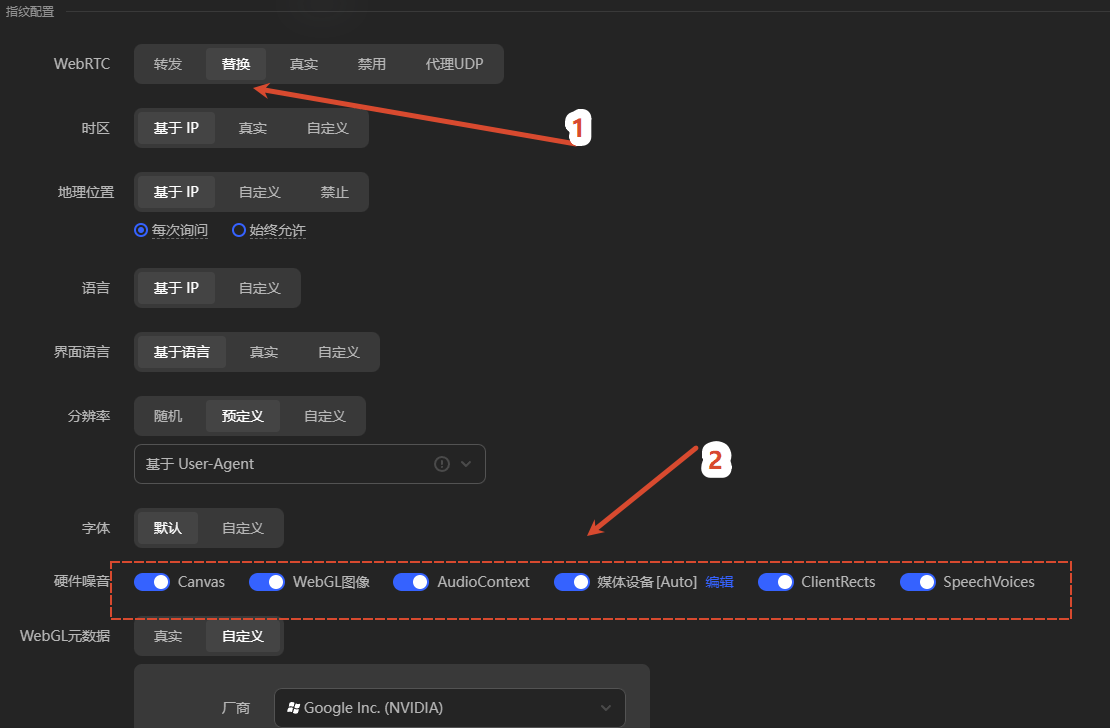 Check whether the time zone, geographical location, and language follow the proxy. These items should be consistent with the proxy exit country.
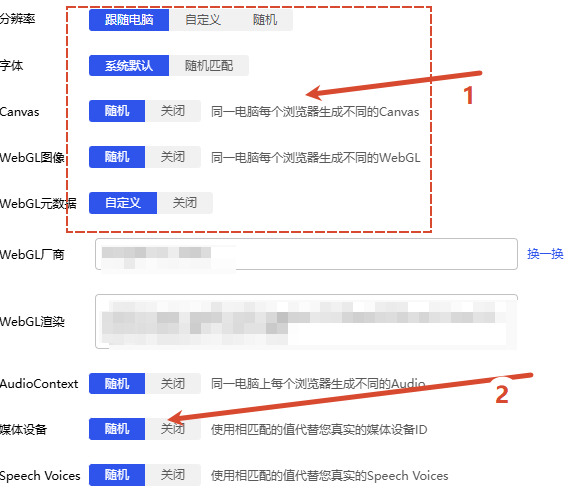
Check the random/off settings for Canvas and media devices. It is recommended to keep the default 'random/off' policy so that each environment is different from one another.
| Configuration Item | Recommended Value | Description |
|---|---|---|
| Time Zone | Time zone consistent with the country of the proxy | The device is in the Asian time zone, IP is in Germany, which is the most common consistency gap. |
| Language / Interface Language | Target Market Language (e.g., en-US, de-DE) | It only needs to match the country of the IP, no need to change to an unusual combination. |
| Location | Based on IP / Follow proxy | Do not manually enter a city that does not match the proxy. |
| WebRTC | Disable or follow the proxy | Avoid leaking the real internal network IP. |
| Resolution / Font | Random or follow system | Do not make all environments exactly the same within the same batch. |
| Canvas / WebGL / Audio | Random / Off | Make the fingerprint of each environment independent from each other. |
| Media Devices | Turn off or replace with the same value | Avoid exposing the real camera/microphone ID. |
Maintain an Environment Inventory
When there are many environments, the most common problem is 'which environment used which IP and session.' It is recommended that the team keeps a ledger, which can save a lot of time when troubleshooting:
| Environment Name | Product Line | Certification Method | Region (Country/State/City) | Session / IP | Bound Account | Remarks | Status |
|---|---|---|---|---|---|---|---|
| AdsPower-US-01 | Dynamic Residential Proxy | Username and Password Batch Generation | US / ALASKA / ANCHORAGE | session-7BhsSJv2 | Social Media Account A | life-60 | Normal |
| BIT-DE-02 | Dynamic Residential Proxy | Account Credentials Batch Generation | DE / BAVARIA / NUREMBERG | session-mgxL1YIa | E-commerce Store B | life-120 | Normal |
| Hubstudio-ES-03 | Dynamic Residential Proxy | Account Credentials Batch Generation | ES / ANDALUCIA / ALMERIA | session-es03xxxx | Ad Account C | life-60 | Normal |
Which antidetect browser should be chosen
| Client | Suitable Scenarios | Corresponding Section in This Article |
|---|---|---|
| AdsPower | Team collaboration, bulk environment management, API automation | AdsPower Configuration |
| BitBrowser | Commonly used by domestic teams, proxy management and window separation, supports API extraction | BitBrowser Configuration |
| Hubstudio | Built-in environment detection panel, social media and multi-account cross-border | Hubstudio Configuration |
| Dolphin (Dolphin Anty) | Overseas Teams, Workbench, and Group Management | Dolphin Browser Configuration |
| Zi Niao / Yang Tao / VMLogin / ixBrowser / Maskfog / Multilogin, etc. | Specific teams or existing procurement | Other browsers and extension solutions |