
Authentication: Username/Password vs API Extraction
Categories: Getting Started | Updated: 2026-09-14
Neither method is universally better. Choose the one that fits your product and integration workflow.
On this page:
- Key differences between the two methods
- Choose a method in three steps
- How to choose the "code language" in the dashboard
- Using username/password authentication and API extraction together
Key differences between the two methods
Duckip supports username/password authentication and API extraction. Both provide usable proxies, but they place IP allocation, region selection, and lifetime control in different parts of your integration.
| Comparison | Username/Password Authentication | API Extraction |
|---|---|---|
| Credentials | Proxy host + port + username + password. The username contains region, lifetime, and session parameters. | An HTTPS URL containing an app_key; requesting it returns a proxy list. |
| Whitelist | Follow the dashboard requirements for the selected sub-account. | Required before use. Add the egress IP of the upstream overseas node. |
| IP controls | Username parameters: area / state / city / asn / life / session | URL parameters: cc / state / city / life / num |
| Output | One or more proxy entries in a selected format. | A list containing the number of proxies specified by num; your application parses and distributes the results. |
| Applicable Products | Dynamic Residential Proxies, Unlimited Residential Proxies, Static Residential Proxies (Traffic/Bandwidth) | Dynamic Residential Proxies Only, Unlimited Residential Proxies |
| Typical use cases | Multiple antidetect browser profiles, client software, mobile apps, and command-line connectivity tests | Custom data collection programs, schedulers, and antidetect browsers with API extraction support |
Two common configuration errors
- API extraction is used before the upstream egress IP is added under Whitelist Management, causing an authentication error or empty response. 2. An antidetect browser requests more than one proxy at a time, causing a profile's egress IP to change. Set
num=1for antidetect browser profiles.
Choose a method in three steps
- Identify the client. Prefer username/password authentication for antidetect browsers, client software, and mobile apps. Custom programs and schedulers can use either method, while API extraction is often easier for distributing proxies in bulk.
- Check the product. Static residential proxies support username/password authentication only. Dynamic and unlimited residential proxies support both methods.
- Decide who manages the proxy list. Use API extraction when your application must fetch and distribute a batch of proxies. Use username/password authentication when each client or browser profile needs one stable session.
How to choose the "code language" in the dashboard
The Select Code Language setting changes only the generated example and output format. It does not change the proxy itself. Choose a format based on the client:
| Client | Recommended option | Reason |
|---|---|---|
| Antidetect browser bulk setup | Bulk Generation | Generates multiple host:port:user:pass entries for bulk import. |
| Mobile device or common proxy tool | Common Mode | Shows the standard Proxy Server, Port, Username, and Password fields. |
| Connectivity test | Shell | Generates a command you can paste into a terminal to view the egress IP. |
| Application integration | Python, Node.js, Go, Java, PHP, C#, Ruby, or Rust | Generates a basic proxy request example in the selected language. |
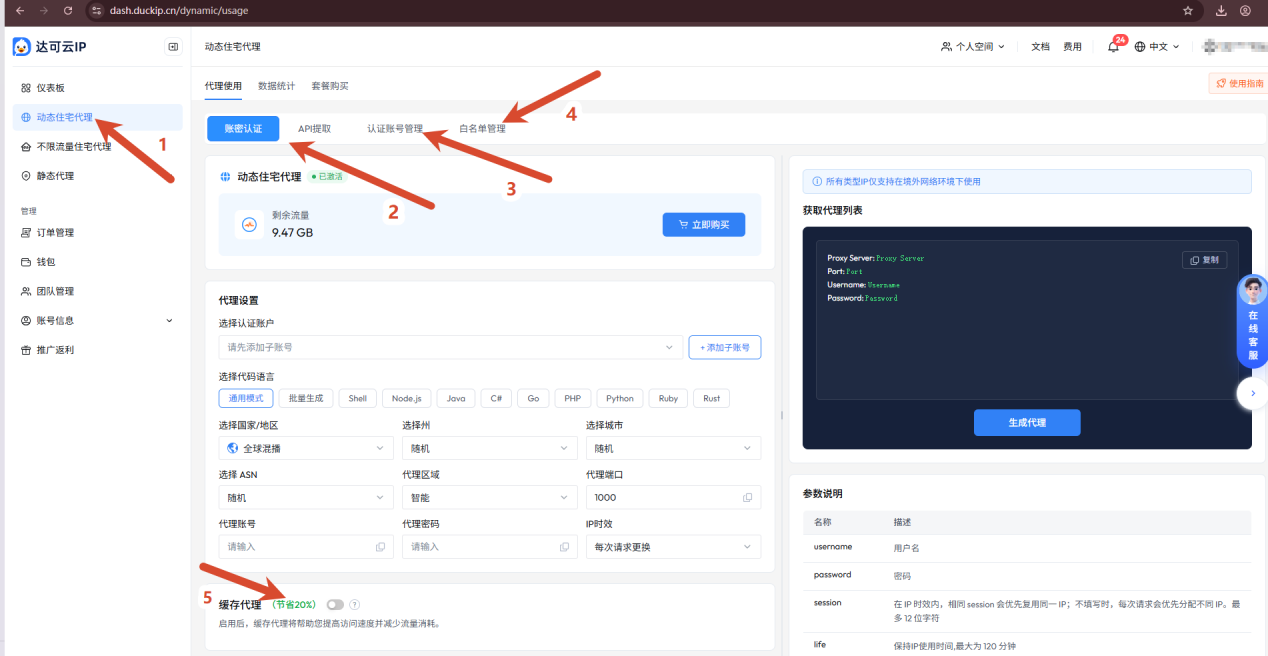
Username/Password Authentication and API Extraction appear as tabs on the same page. Before switching, confirm the selected product and its remaining quota.
Use both methods under one plan
You can use both methods under the same product plan. For example, a custom crawler can retrieve proxies through API extraction, while an antidetect browser uses username/password authentication with a fixed session. Both consume the selected plan's allowance. Other plans under the same main account are metered and billed separately.
| Dimension | Rule | Description |
|---|---|---|
| Account ownership | Same main account | Usage from username/password authentication and API extraction belongs to the main account and appears together in the main-account view under "Data Statistics." |
| Billing | Per plan | Dynamic residential plans are billed by traffic, static residential plans by traffic or bandwidth, and unlimited residential plans by bandwidth, concurrency, and billing period. Each plan is metered and billed independently. |
| Sub-account attribution | Sub-accounts are tied by plan | Each sub-account in the authentication account management must specify a product type; Sub-accounts in different plans are different and cannot be reused across plans. |
| Cross-plan usage | Configure each plan separately | Using a sub-account from plan A with a host from plan B returns an Account unavailable error. Select or create a sub-account under the matching plan. |
Two reminders when using multiple plans
- Monitor each plan separately because quota, billing, and expiration dates differ even under the same main account. 2. Create a separate sub-account for each plan and include the plan in its name, such as
dyn-us-01orstatic-bw-01, to prevent configuration mistakes.
Recommended setup for antidetect browsers Assign each browser profile a unique session of up to 12 characters and set the IP lifetime to Specify Duration. This keeps the profile's IP stable without requiring you to maintain an IP list. See Parameters and Output Formats for details.